Block WiFi until chores are done (without daily fighting)
If this sounds exhausting, you’re not wrong. The hard part isn’t the rule—it’s enforcing it every day. This guide shows the simplest version that works, plus how to automate it so you’re not the enforcer.
The real problem isn’t chores. It’s enforcement.
If you’re already tired, being told to “just be consistent” is not helpful. The hard part isn’t knowing what to do—it’s the daily overhead.
- Remembering the rule
- Checking if the chore is actually done
- Arguing about exceptions (“just five minutes”)
- Being the one who has to flip the switch
Keep homework/school access separate if you need it.

Two ways to run this rule
DIY can work. But if your goal is less work for you, automation is the shortcut.
Option A: DIY enforcement (free, but parent-powered)
- You decide the chores and the WiFi window
- You check the chores
- You block/unblock access manually
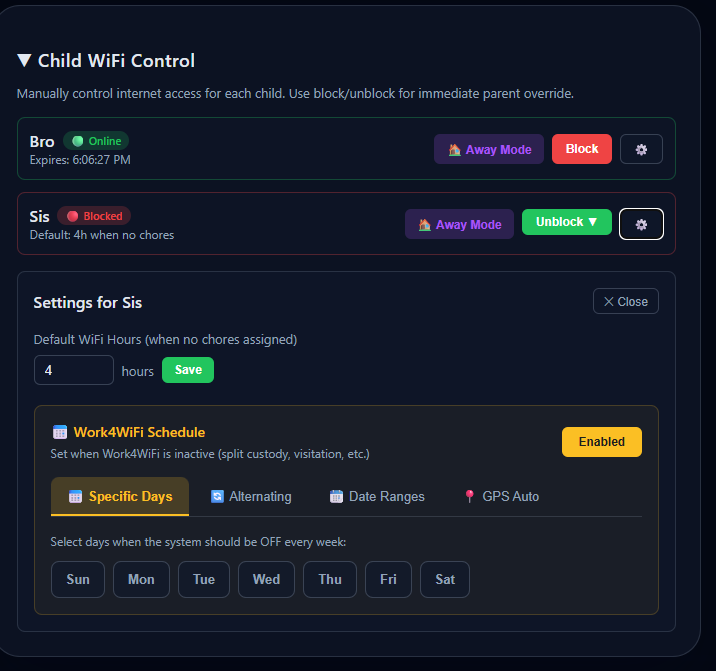
Option B: Automate it (Work4WiFi)
- Set chores + rewards once in the parent dashboard
- Kids submit a photo when they’re done
- AI can approve instantly (and you can override anytime)
- WiFi unlocks based on the rule—without you negotiating in the moment
The low-effort setup (10 minutes, not a lifestyle change)
You’re not building a “perfect system.” You’re building one small daily win that sticks.
Pick one daily chore
Start with the smallest possible win (something that takes < 10 minutes). You can add later.
Define “done” like a checklist
One sentence is enough. The goal is clarity, not perfection.
Decide what unlocks
Most families separate homework access from entertainment. Then the rule feels fair and predictable.

Common traps (and the low-effort fix)
These are the things that usually turn a good idea into nightly arguing. Fixing them doesn’t require more effort—just fewer moving parts.
Too many chores at once
Start with one daily chore. The fastest way to fail is to roll out a full system on day one.
Arguing in the moment
Arguing teaches kids that persistence changes rules. Repeat the plan once, then disengage.
No homework plan
Decide your homework exception in advance. It prevents last-minute battles and keeps the rule feeling fair.
Parent becomes the “WiFi police”
If you’re manually enforcing, it’s easy to get pulled into negotiations. Automation helps the rule stay consistent on busy days.
If you want the rule without the workload
Work4WiFi was built to remove the daily enforcement job. Set chores once in the parent dashboard; kids submit a photo when done, AI verifies, and WiFi unlocks automatically. Use the Work4WiFi Hub for every device on your network, or the Android app on your child’s phone.
Get Started FreeFAQ
Is blocking WiFi too harsh?
It can be if it’s used as a punishment. The healthier version is a predictable household routine: chores first, then entertainment. Keep the tone calm and the rule consistent.
What about homework and school access?
Separate the two. Many families keep a homework window available regardless of chores and use the chores rule for games/social/streaming.
What age does this work best for?
It’s easiest for ages 6–13 when chores are concrete. For teens, it works best if you negotiate the deal once and treat it like a household policy.
How do I stop constant arguing?
Don’t argue in the moment. Point back to the plan and stay neutral. Most kids test for a few days; consistency is what ends the cycle.