Before Screens Checklist: A Simple Daily Routine for Kids
A before screens checklist gives kids a clear, repeatable path to earn screen time every day. No negotiating, no reminding, no arguing. Print it. Post it. Use it tonight.
Why a before screens checklist works
Arguments about screen time happen when expectations are unclear. A before screens checklist fixes that by making the requirements visible, specific, and the same every day.
- Visual and concrete — kids see exactly what's required (no "you know what you need to do")
- Self-directed — kids check items off at their own pace, which builds ownership
- Eliminates negotiations — the checklist is the rule, not you
- Combines self-care + chores — morning routine and household tasks in one list
- Builds daily habits — after 2 weeks, it's automatic
Printable before screens checklists
Pick the checklist that matches your child's age. Print this page (Ctrl+P / Cmd+P) and post it where they'll see it first thing.
☀️ Morning Before Screens — Ages 4–7
Simple tasks, short list. Focus on building the habit.
Customize: swap any item to fit your family's routine.
📋 Morning Before Screens — Ages 8–12
Adds a household chore. Builds real responsibility.
Customize: rotate the daily chore each week to build skills.
🎯 Daily Before Screens — Ages 13+
Full routine for teens. Contribution-focused.
Customize: let teens pick their chore from a weekly list for buy-in.
How to make the before screens checklist stick
Post it where they can't miss it
Refrigerator, bathroom mirror, or bedroom door. The checklist should be the first thing they see in the morning — before they even think about screens.
Don't remind — point to the list
When your kid asks "Can I play my game?" your answer is: "Check the list." Not an argument. Not a lecture. Just: "Check the list." Every time.
Hold firm for 7 days straight
The first week has the most pushback. Don't cave, don't negotiate, don't make exceptions. After 7 consistent days, kids stop testing and start doing.
Verify the chore (the hard part)
Self-care items are easy to verify at a glance. The household chore is harder. This is where most families eventually automate — because manually checking every day leads to burnout or shortcuts.
Celebrate streaks, not perfection
"You've done your checklist 5 days in a row — that's awesome." Positive reinforcement builds habits faster than criticism. Work4WiFi tracks chore streaks automatically.
Automate the hardest part: chore verification
Paper checklists work great for self-care items. But the household chore — the one that actually earns screen time — is where things break down. Did they really clean? Did they actually unload the dishwasher? Did they just check the box without doing it?
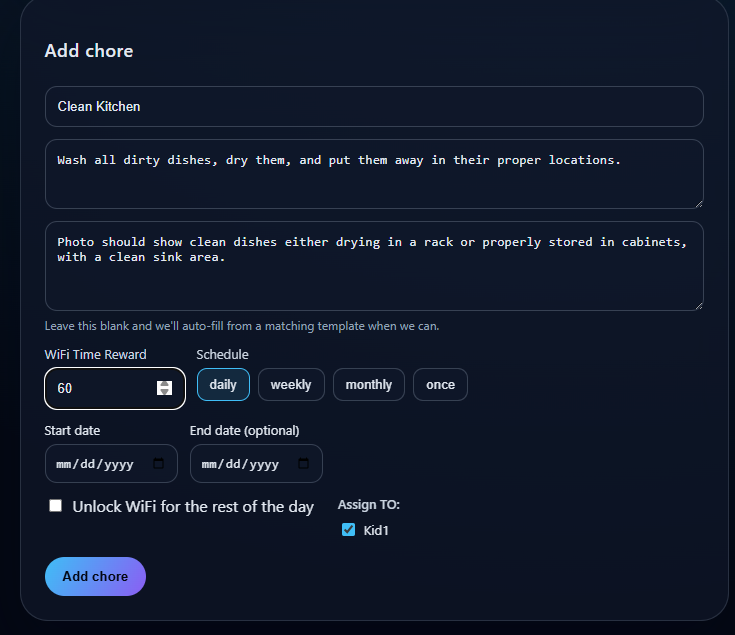
Work4WiFi solves this. Instead of trusting a checkbox, kids submit a photo of the completed chore. AI verifies it matches the task. If it passes, WiFi unlocks automatically for their devices. If not, they get feedback and resubmit.
- Photo proof — no more "I already did it" lies
- AI verification — faster and more consistent than checking yourself
- Automatic WiFi unlock — no manual toggling
- Works for every device — phones, tablets, consoles, laptops, TVs
- Streak tracking — kids see their progress and stay motivated
Before screens checklist — FAQ
What is a before screens checklist?
A list of tasks kids complete daily before they can use electronic devices for entertainment. It combines self-care (brush teeth, get dressed), responsibilities (homework, make bed), and household chores into one predictable routine.
What should I include on the checklist?
4–6 items covering self-care, basic responsibilities, and one household chore. Keep the total time under 20–30 minutes. The household chore is what differentiates this from a basic morning routine — it's the "earn" part of earning screen time.
How do I enforce it?
Post it where kids see it. When they ask for screens, say "Check the list." Verify the household chore is done. For automated enforcement, Work4WiFi ties chore completion to WiFi access — kids submit a photo, AI verifies, and internet unlocks.
At what age should I start?
Age 4–5 with 3–4 simple items. Ages 6–8 with a full morning routine. Ages 9+ with homework and real household chores included. The structure stays the same — the items change with age.
What if my kid just checks boxes without doing the tasks?
This is the biggest challenge with paper checklists. Self-care items are easy to verify at a glance. For household chores, consider Work4WiFi's photo verification — kids submit a photo and AI confirms the task is actually done.
Should the checklist be the same every day?
Self-care items: yes, same daily. Household chores: rotate weekly to build different skills and prevent boredom. Sunday is a good day to update the chore for the upcoming week.
Ready to automate the checklist?
Work4WiFi turns the before screens checklist into an automated system. Kids submit photos, AI verifies, screen time unlocks. Free to start.
Get Started Free