Chores Before Electronics: One Simple Rule for Every Device
Phones. Tablets. Gaming consoles. TV. Laptops. One rule covers them all: chores first, electronics second. This guide shows you how to set it up, enforce it without arguing, and automate the whole thing.
Chores before electronics vs. chores before screen time — what's the difference?
"Chores before electronics" is the broader version of "chores before screen time." While screen time typically refers to phones and tablets, electronics covers everything: gaming consoles, smart TVs, laptops, desktop computers, VR headsets — any device your kid uses for entertainment.
The beauty of this approach: one rule, every device. No loophole where the phone is blocked but the PlayStation isn't. No confusion about which screens count. If it plugs in or charges and provides entertainment, chores come first.
Every device this rule covers
Modern kids don't just use one screen — they jump between devices. Here's how chores before electronics applies to each one.
📱 Smartphones
The #1 entertainment device for teens. Social media, YouTube, TikTok, messaging, gaming — all require internet. Block WiFi and cellular data until chores are done.
🎮 Gaming Consoles
PS5, Xbox, Nintendo Switch — online gaming and game downloads require WiFi. Block internet access and online play is off the table until chores pass.
💻 Laptops & Desktops
YouTube, gaming, social media, streaming — all internet-dependent. Block WiFi access and entertainment stops. Homework access can stay open.
📺 Smart TVs & Streaming
Netflix, Disney+, YouTube, Hulu — all WiFi-dependent. Block the TV's internet and streaming stops instantly. Cable/antenna is the only exception.
📲 Tablets & iPads
Whether it's an iPad, Kindle Fire, or Android tablet — games, apps, and streaming all need internet. Block it until chores are verified.
🥽 VR Headsets
Meta Quest, PlayStation VR — online games, social VR, and app downloads all require WiFi. Block it at the router and the headset is offline.
The WiFi trick: control one thing, control everything
Here's the insight that makes "chores before electronics" actually enforceable: virtually every electronic device needs WiFi to be useful for entertainment.
You don't need to confiscate phones, hide controllers, or install apps on every device. You just need to control one thing: WiFi access.
- No WiFi = no YouTube, TikTok, Instagram, Snapchat
- No WiFi = no online gaming (Fortnite, Roblox, Minecraft servers)
- No WiFi = no Netflix, Disney+, Hulu, streaming
- No WiFi = no game/app downloads
- No WiFi = no messaging apps (WhatsApp, Discord, iMessage over WiFi)
How to set up chores before electronics in 10 minutes
List the devices your kid uses
Phone, tablet, console, laptop, TV? Write them down. This is your "electronics inventory." Most families are surprised by how many devices their kids have access to.
Pick 1–2 daily chores
Start with one chore that takes under 10 minutes. Make bed, unload dishwasher, take out trash. You can add more once the habit is established.
Announce the rule once
"Starting tomorrow, entertainment electronics are available after your chore is done." Be calm. Be clear. Don't apologize or negotiate.
Set up enforcement
Option A: Manually check chores and toggle WiFi. Works short-term but leads to burnout.
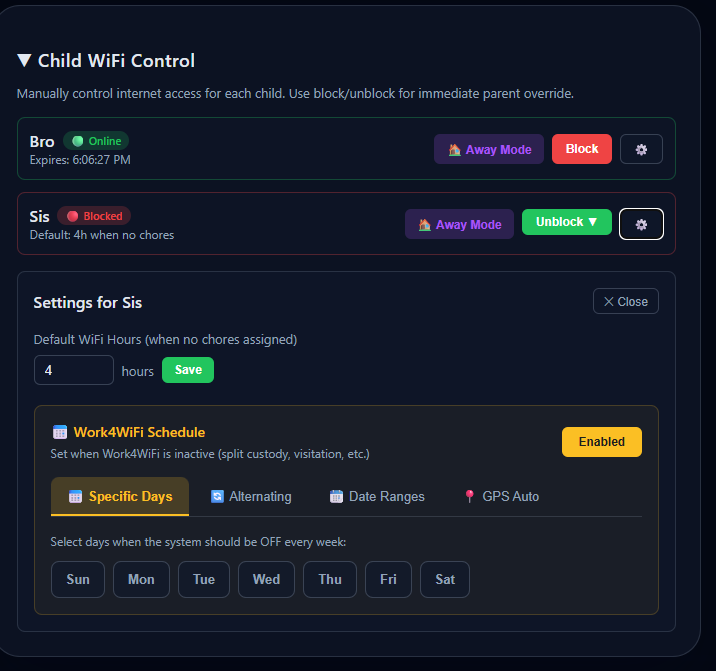
Option B: Use Work4WiFi Hub — controls WiFi for every device automatically. Kids submit a chore photo, AI verifies, WiFi unlocks. No daily policing.
Exempt homework access
Make sure schoolwork access stays on. The chores before electronics rule applies to entertainment only. Work4WiFi lets you separate educational and entertainment access.
Two ways to enforce chores before electronics
Android App (free to start)
- Controls WiFi + cellular on Android devices
- AI chore verification built in
- Bypass-resistant — alerts if tampered with
- Best for: families with Android phones/tablets
- Free tier available
Work4WiFi Hub ($69 one-time)
- Controls every device — phones, consoles, TVs, laptops, VR
- Router-level control — nothing to install on kid's devices
- Works for iPhones, iPads, PS5, Xbox, Switch, smart TVs
- Best for: families wanting whole-home electronics control
- 30-day money-back guarantee · 12-month warranty
Chores before electronics — FAQ
What does "chores before electronics" mean?
It's a household rule where kids must complete assigned chores before using any electronic device for entertainment — phones, tablets, gaming consoles, computers, and TV. It's broader than "screen time" because it covers every device.
How do I block all electronics at once?
Control the internet. Since virtually every entertainment electronic needs WiFi, blocking WiFi effectively blocks them all. The Work4WiFi Hub does this at the router level for each child's devices individually.
Does this work for PS5, Xbox, and Nintendo Switch?
Yes. The Work4WiFi Hub blocks WiFi at the router, which stops online gaming, streaming, and downloads on any console. Nothing to install on the console itself.
What about TV?
If your TV streams via WiFi (Netflix, YouTube, Disney+), the Hub can block it. Cable/antenna TV would need to be enforced manually, but most kids watch streaming content.
Is this too strict?
Not when framed as routine. Electronics aren't banned — they're earned. Keep chores age-appropriate, exempt homework access, and keep the tone neutral. Most families report fewer fights within the first week.
Ready to enforce chores before electronics?
Control every device in one place. Free to start. Set up in 5 minutes.
Get Started Free