Chores Before Screen Time: The Complete Guide for Parents
Your kids want screens. You want chores done. This guide shows you how to connect the two with a simple rule that ends daily arguments — and how to make it run on autopilot.
What does "chores before screen time" mean?
Chores before screen time is a household rule: kids must finish assigned chores before they can use any device for entertainment — phones, tablets, gaming consoles, computers, or TV.
It's not about banning screens. It's about teaching kids that entertainment comes after contribution. The rule is simple: responsibilities first, screens second.
- Predictable for everyone — kids know exactly what's required
- Eliminates daily negotiation — the rule doesn't bend based on mood or tantrums
- Builds real-world habits — delayed gratification is a life skill
- Works for every device — phones, tablets, gaming consoles, laptops, TV

Why chores before screen time works better than time limits
Most screen time strategies fail because they rely on willpower — yours and your kid's. Timers run out, arguments start, and you're back to square one. Chores before screen time works because it's structural, not emotional.
What usually fails
- Time limits with no enforcement mechanism
- Verbal reminders ("You've had enough screen time!")
- Parental control apps kids can uninstall
- Confiscating devices (escalates conflict)
- Screen time "allowances" that reset the fight daily
Why chores first sticks
- Screen time is the #1 motivator for kids — more than allowance
- Binary rule: chores done = screens on. No gray area.
- Kids feel in control — they decide when to earn access
- No "just 5 more minutes" — the requirement is chores, not time
- Can be fully automated so parents aren't the gatekeeper
Chores before screen time by age
The rule stays the same — the chores change. Here's what works at every stage.
Ages 4–6: Start simple
- Put toys away in bins
- Put dirty clothes in hamper
- Help feed a pet
- Wipe table after meals
Ages 7–9: Build independence
- Make their own bed
- Unload dishwasher (bottom rack)
- Take out recycling
- Tidy their room
Ages 10–12: Real responsibility
- Load/unload dishwasher fully
- Vacuum or sweep a room
- Fold and put away laundry
- Clean a bathroom
Ages 13+: Household contributor
- Cook a simple meal
- Mow the lawn / shovel snow
- Do their own laundry start to finish
- Clean the kitchen after dinner
How to set up chores before screen time (step by step)
You don't need a perfect system. You need a 10-minute setup that sticks.
Pick one daily chore per child
Start with a single task that takes under 10 minutes. Choose from the age-appropriate list above. You can always add more once the routine is established.
Define "done" in one sentence
Write down exactly what complete looks like. "Bed made with pillow at top and blanket pulled up." Clear expectations prevent 90% of arguments.
Announce the rule calmly, once
"Starting tomorrow, screen time begins after your chore is done. Here's your chore." State it. Don't negotiate. Don't apologize. Revisit it after a week if needed.
Automate the enforcement
This is where most families fail — because manually checking chores and managing screen access is exhausting. With Work4WiFi, the child submits a photo of the completed chore, AI verifies it in seconds, and internet/WiFi unlocks automatically. You don't have to be the bad guy.
Hold firm for 7 days
The first week is the hardest. Your child will test the boundary. Don't cave, don't debate, don't renegotiate in the moment. After 7 days, it's just routine.

6 mistakes that wreck chores before screen time
Most families that give up didn't fail at the concept — they failed at execution. Here's what not to do.
1. Too many chores at once
Start with one chore. Adding more later is easy. Starting with five and scaling back feels like defeat for everyone.
2. Vague definitions
"Clean your room" means different things to a parent and a 10-year-old. Be specific: "Floor clear, bed made, dirty clothes in hamper."
3. Giving in to pushback
The moment you cave on "just this once," the rule is broken. Don't debate in the moment. Point to the rule. Stay neutral and boring.
4. Being the manual enforcer
Checking chores, toggling WiFi, remembering who did what — this falls on the parent and causes burnout. Automate the enforcement.
5. Framing it as punishment
"No screens because you were bad" is punishment. "Screens turn on after chores" is routine. The framing matters. Keep it neutral.
6. Blocking homework access
Chores before screen time should only apply to entertainment. Kids should always have internet access for schoolwork, research, and reading.
How Work4WiFi automates chores before screen time
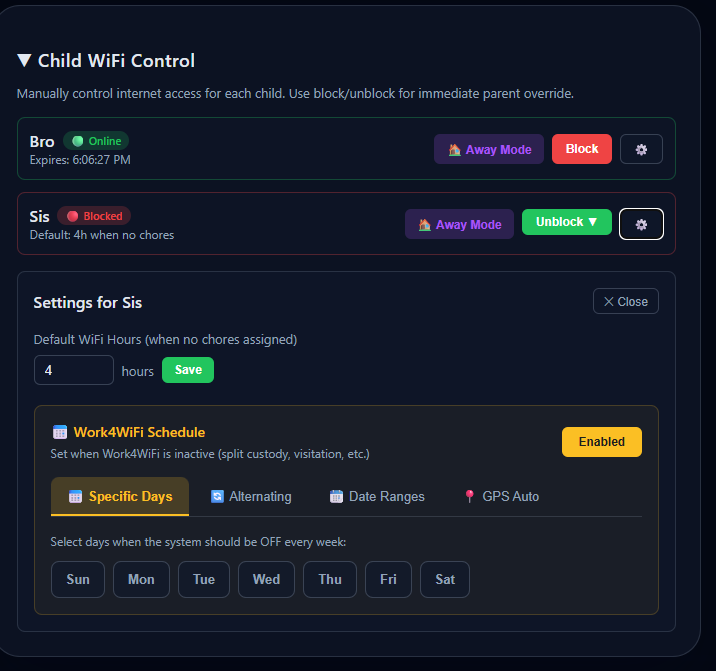
Work4WiFi exists for one reason: make "chores before screen time" run itself so you don't have to be the enforcer, the reminder, or the bad guy.
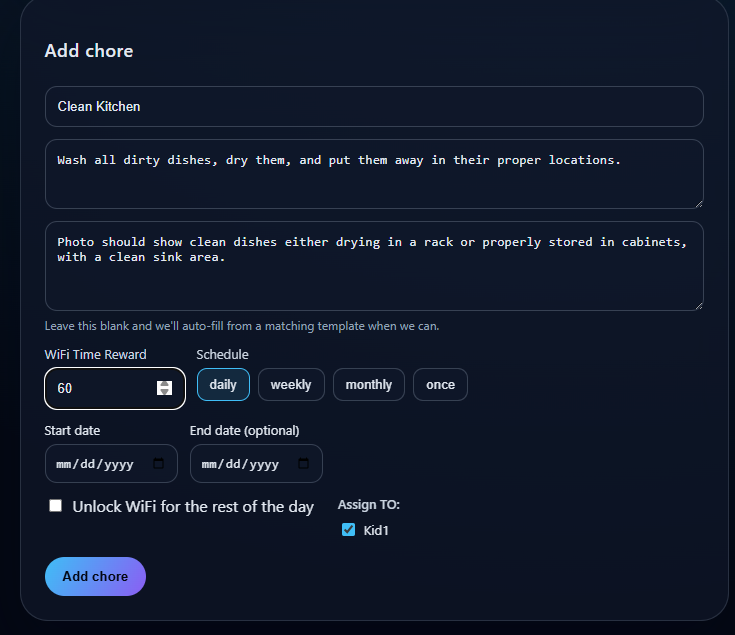
Parent sets the chores
Add chores in the parent dashboard with a description and optional photo example. Takes about 2 minutes per chore.
Kid submits a photo
When the chore is done, the child takes a photo through the Work4WiFi app (Android) or any device with a camera (Hub). No texting, no verbal confirmation needed.
AI verifies the work
Our AI checks the photo against the chore description. If it passes, screen time unlocks automatically. If not, the child gets specific feedback and can resubmit.
Screen time unlocks — no parent involvement
The whole process happens without you. You get a notification, but you don't have to do anything. Override anytime if needed.
Two ways to enforce chores before screen time
Whether your kids use Android, iPhones, gaming consoles, or all of the above — there's an option.
Android App (free to start)
- Install on your child's Android device
- Controls both WiFi and cellular data
- Bypass-resistant — alerts you if tampered with
- AI chore verification built in
- Free tier available, upgrade for more kids/chores
Work4WiFi Hub ($69 one-time)
- Controls every device — iPhones, iPads, PS5, Switch, laptops, smart TVs
- No app needed on kids' devices — nothing to uninstall
- Router-level control — impossible to bypass from the device
- Kids submit chore photos from any device with a camera
- 30-day money-back guarantee · 12-month warranty
Chores before screen time — FAQ
What does "chores before screen time" mean?
It's a household rule where kids must finish their assigned chores before they can use phones, tablets, computers, gaming consoles, or TV for entertainment. Screen time is earned through responsibility, not given by default.
At what age should I start chores before screen time?
As young as age 4 with simple tasks (put toys away, put clothes in hamper). Ages 6–8 can make beds and feed pets. Ages 9–12 can do dishes and laundry. Teens can handle any household chore. Match the chore to the child's ability.
How do I enforce it without constant arguing?
Set the rule once and use automation. With Work4WiFi, kids submit a photo of their completed chore, AI verifies it, and internet access unlocks automatically. The system enforces the rule so you don't have to argue.
Is chores before screen time harmful to kids?
No — when framed as a routine rather than a punishment. It teaches responsibility and delayed gratification. Research shows kids with consistent boundaries have better sleep, focus, and emotional regulation.
What about homework that needs screens?
Always keep homework access separate. Chores before screen time applies to entertainment only — games, social media, YouTube, streaming. Work4WiFi lets you configure which access requires chores.
How many chores should I require?
Start with one chore under 10 minutes. Once the habit is established (1–2 weeks), add a second. Too many chores on day one leads to resistance.
Does it work for teenagers?
Yes — often better than younger kids. Teens are highly motivated by internet access. Frame it as a household policy. With the Work4WiFi Hub, control happens at the router so there's nothing on their device to bypass.
Can I automate chores before screen time?
Yes. Work4WiFi automates everything: parent sets chores, kid submits a photo, AI verifies, and screen time unlocks. No manual checking, no arguments, no daily policing.
Ready to try chores before screen time?
Set it up in under 5 minutes. Free to start. No credit card required.
Get Started Free