Chores Before WiFi: The Complete Guide for Parents
Kids do chores first. Then they get WiFi. No yelling, no negotiations, no being the "bad guy." This guide covers everything: what chores before WiFi means, how to set it up, common mistakes, and how to automate the whole thing.
What does "chores before WiFi" actually mean?
It's a simple household rule: kids complete their assigned chores before they get internet access. WiFi stays off until chores are done and verified.
The idea isn't new — parents have always tied privileges to responsibilities. But WiFi is now the #1 motivator for most kids, which makes it the most effective leverage parents have.
- Clear and predictable — kids know exactly what's expected
- No daily negotiation — the rule doesn't change based on mood
- Teaches responsibility — screen time becomes something kids earn
- Reduces arguments — the system enforces the rule, not you

Why chores before WiFi works (when other methods don't)
Most parenting strategies around screen time fail because they rely on willpower — yours and your kid's. Chores before WiFi works because it's structural.
What usually fails
- Verbal reminders ("Did you do your chores?")
- Time limits with no enforcement
- Screen time apps kids can uninstall
- Taking the phone away (escalates conflict)
Why chores before WiFi sticks
- WiFi is the #1 motivator — more than allowance
- The rule is binary: chores done = WiFi on
- No ambiguity, no "just 5 more minutes"
- Can be automated so you're not the gatekeeper
How to set up chores before WiFi (step by step)
You don't need a perfect system. You need a 10-minute setup that sticks.
Pick 1–2 daily chores
Start small. One chore that takes less than 10 minutes. You can always add more later. Examples: make bed, unload dishwasher, take out trash, clean room.
Define "done" clearly
Write one sentence that describes what "done" looks like. "Bed made with pillow at top and blanket pulled up." Clear expectations prevent arguments.
Announce the rule once
"Starting tomorrow, WiFi turns on after your chores are done. Here's the chore list." State it calmly. Don't negotiate. Revisit it after a week if needed.
Enforce automatically
This is where most parents fail — because manual enforcement is exhausting. With Work4WiFi, kids submit a photo of their completed chore, AI verifies it in seconds, and WiFi unlocks. No nagging required.

5 common mistakes with chores before WiFi
Most families that give up on chores before WiFi didn't fail at the concept — they failed at execution. Here's what to avoid.
1. Too many chores on day one
Start with one chore. Seriously. Adding more later is easy. Starting with five and scaling back feels like defeat — for everyone.
2. Vague chore definitions
"Clean your room" means different things to a parent and a 10-year-old. Be specific: "Floor clear, bed made, dirty clothes in hamper."
3. Arguing about exceptions
The moment you cave on "just this once," the rule is broken. Don't debate in the moment. Point to the rule. Stay neutral.
4. Being the manual enforcer
Checking chores, flipping the WiFi on and off, remembering what was done — this workload falls on the parent and leads to burnout. Automate it.
5. Using it as punishment
Chores before WiFi is a routine, not a consequence. "No WiFi because you were rude" is different from "WiFi turns on after chores." Keep the tone neutral.
How Work4WiFi automates chores before WiFi
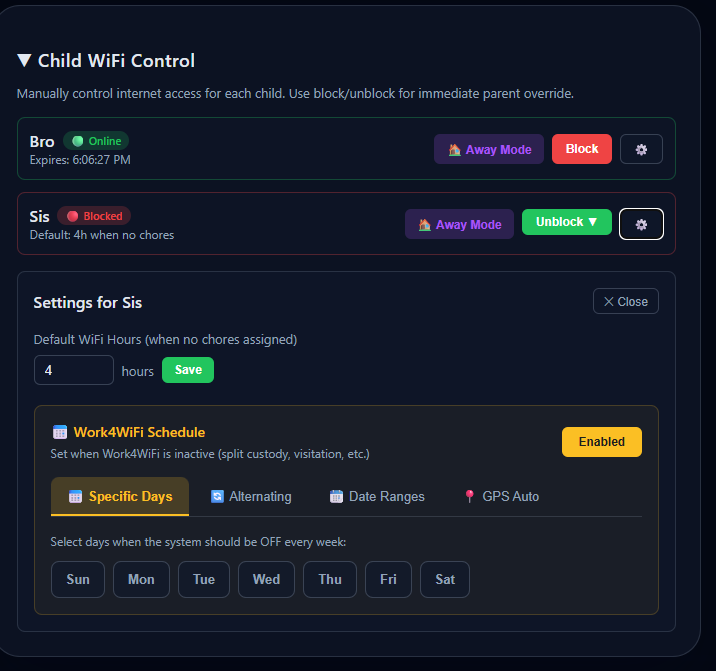
Work4WiFi exists for one reason: make "chores before WiFi" run itself so you don't have to be the enforcer.
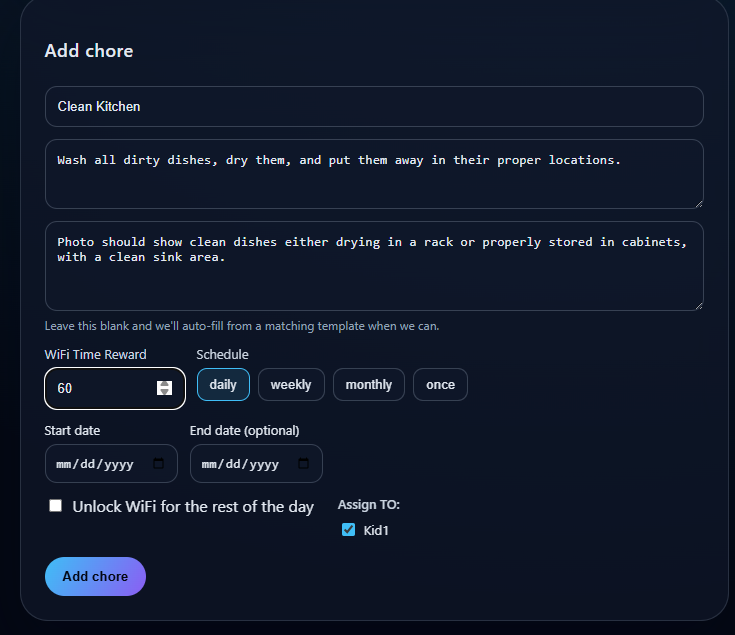
Parent sets the chores
Add chores in the parent dashboard with a description and optional photo example. Takes about 2 minutes per chore.
Kid submits a photo
When the chore is done, the child takes a photo through the app (Android) or any device with a camera (Hub). No texting, no verbal confirmation.
AI verifies the work
Our AI checks the photo against the chore description. If it passes, WiFi unlocks automatically. If not, the child gets specific feedback ("looks like the bed isn't made yet") and can resubmit.
WiFi unlocks — no parent needed
The whole process happens without you. You get a notification, but you don't have to do anything. Override anytime if needed.
Two ways to enforce chores before WiFi
Whether your kids use Android or iPhones (or gaming consoles), we have you covered.
Android App (free to start)
- Install directly on your child's Android device
- Controls both WiFi and cellular data
- Bypass-resistant — alerts you if tampered with
- AI chore verification built in
- Free tier available, upgrade for more kids/chores
Work4WiFi Hub ($69 one-time)
- Controls every device on your network — iPhones, iPads, PS5, Switch, laptops
- No app needed on kids' devices — nothing to uninstall
- Router-level blocking — impossible to bypass from the device
- Kids submit chore photos from any device with a camera
- 30-day money-back guarantee · 12-month warranty
Chores before WiFi — Frequently Asked Questions
What does "chores before WiFi" mean?
It's a household rule where kids must complete their assigned chores before they can access the internet. WiFi stays blocked until chores are done and verified — either by a parent checking manually or automatically with AI through Work4WiFi.
How do I enforce chores before WiFi without arguing?
Set the rule once and use automation to enforce it. With Work4WiFi, kids submit a photo of their completed chore, AI verifies it in seconds, and WiFi unlocks automatically. You don't have to nag, negotiate, or manually check anything.
Does chores before WiFi work for iPhones and iPads?
Yes — with the Work4WiFi Hub. The Hub plugs into your router and controls WiFi access for every device on your network, including iPhones, iPads, gaming consoles, and laptops. No app needed on the kid's device.
What age is chores before WiFi appropriate for?
Ages 6 and up. For younger kids, keep chores simple and concrete (make bed, put toys away). For teens, frame it as a household policy rather than a punishment — chores done, WiFi on. Most families find it works surprisingly well for teens who are motivated by internet access.
Can kids bypass chores before WiFi?
With the Work4WiFi Hub, control happens at the router — there's nothing on the kid's device to tamper with. The Android app also has multiple bypass-prevention layers. If a bypass attempt is detected, parents are immediately alerted.
Is chores before WiFi too harsh?
Not when framed correctly. It's not a punishment — it's a predictable daily routine. WiFi isn't "taken away." It's earned through small, age-appropriate responsibilities. Keep homework access separate and the tone neutral. Most families report less arguing within the first week.
What about homework that requires the internet?
Separate homework access from entertainment access. Work4WiFi lets you configure which access requires chores. Schoolwork should always be available. Chores before WiFi applies to games, social media, YouTube, and streaming.
How is Work4WiFi different from other parental controls?
Most parental controls are time-based — they limit hours. Work4WiFi is responsibility-based — it ties internet access to completed chores. Kids aren't punished with time limits. They're empowered to earn access by contributing to the household. And AI validates the chores so you don't have to.
Ready to try chores before WiFi?
Set it up in under 5 minutes. Free to start. No credit card required.
Get Started Free